Short Article Vol. 4 No. 2 (2020): International J Health Systems and Implementation Research
Use of Mobile App for Real Time Data Entry and Monitoring: A Case Study of Anti-SARS-CoV-2 IgG Antibody Sero-Surveillance in all Districts of Haryana, India
Mobile App Use for Covid Sero-surveillance
Downloads
Topics
Keywords:
- Covid-19; Surveillance; Sero-surveillance; mobile app; digital technology; monitoring; Realtime data capture
Abstract
Covid-19 has forced major changes in the conduct of the business processes. Public health surveys also face similar challenges. Traditional surveys using the paper-based questionnaire are being replaced with the digital modes of surveys. Many types of mobile based apps are now available. We used a digital survey tool „surveyman.ankaha.com‟ to conduct massive survey in all 22 districts, that was completed in record time of 3 days. Minimum 16 teams from each district registered and used the tool. We are presenting here our experiences with the app and the availability of the functions in the app, so that public health professionals can make better use of it. The app helped not only to capture real time data, but also helped in remote real time monitoring of the activity and to compile the report within one week of the completion of the activity. Dedicated support team at the coordinating headquarter is required during conduct of such massive mission like activities.
Full text
This web version was prepared from the published PDF, which is the version of record. Please cite and quote from the PDF.
Introduction
The COVID-19 pandemic has radically transformed the global work-culture. All business processes have been re-engineered to minimize the physical contact and the paper work [1]. Community-based surveys are an important part of Public Health activity. Traditionally these surveys are done using paper-based tools or forms. The forms are first filled physically (hard-copy), verified, and then the data entry is done on a software. Transcription errors at the time of data entry are a problem with such paper-based format [2]. Also, the entire process is time consuming. Automated processing of forms has thus shown better results over single manual entry of data [3]. It is often difficult to monitor the data collection process, as the location of the surveyor is difficult to track.
Use of mobile phones, tablets, and other hand-held devices have emerged as an alternate to the traditional paper-based data collection. In India, the Auxiliary Nurse and Midwives (ANMs) have been trained in online data collection on ANMOL tablets (ANM online) [4]. Also, many softwares applications (apps) are now available. Public health professionals often use Epicollect, Epidata, KoBo Toolbox, etc. for data collection [5]. Recently, another app called ‘SurveyMan’ available at ‘surveyman.ankaha.com’ has hit the market [6]. The application is made in India and has some novel features to manage large teams. With such novel initiatives being taken in our country, there is a need to explore the use of the softwares/ apps available to the Indian population, and share the experiences.
In this case study we are presenting our experiences with the use of the mobile-based app SurveyMan, which can be downloaded through the website “surveyman.ankaha.com”; for a mammoth survey to conduct sero-surveillance for COVID-19 in all (22) districts of the entire Haryana state.
We supported the Government of Haryana to plan, execute and monitor the sero-surveillance of COVID-19 in the state [7]. The requirements of the survey were - i) the survey was to be done in all (22) districts, with a sample size of approximately 850 interviews per district; ii) in each district 16 clusters were to be surveyed; iii) each cluster was to be managed by one team; and iv) each district was supposed to complete the survey in a maximum of 3 days.
The survey time-frame was same for all the districts. Thus, survey of the entire state was to be completed in 3 days, with all the surveyors and supervisors using the app at one point of time. Geo-coding to capture location of the surveyors in addition to real-time data capture was thus required. Also, as interior areas of districts were to be sampled, the data collection required the option for working offline. The SurveyMan app provided support as per the enlisted requirements and criticalities.
Features of the SurveyMan App
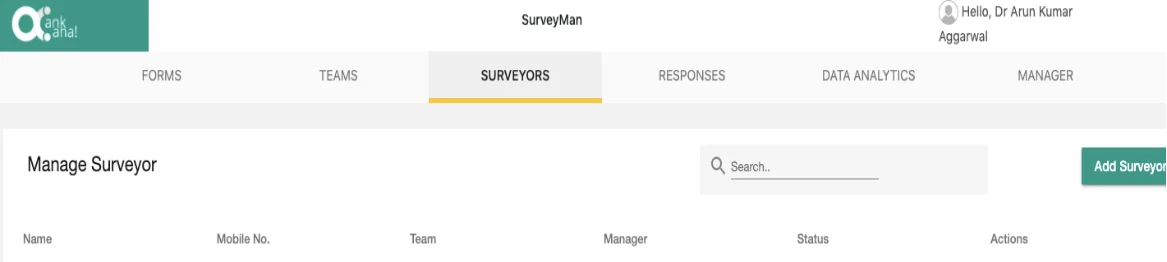
As shown in the screen shot (Figure 1), major features in this app are - a) to create survey forms, b) register the surveyors on the app, c) create teams, d) review the submitted responses of the surveyors, e) ready-to-go basic analytics, and f) to add the managers who manage the teams.
Creation of Form
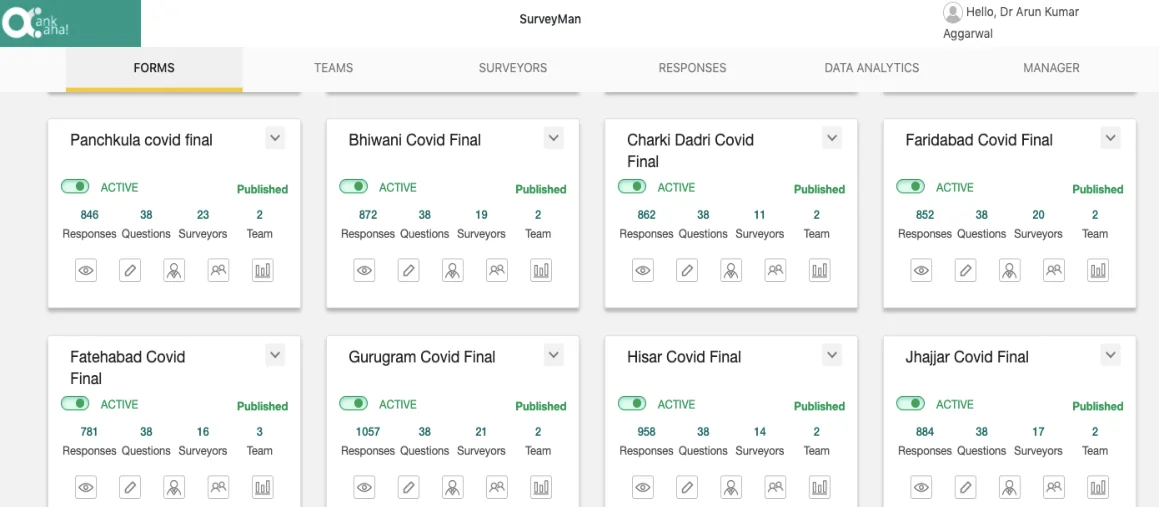
This function is similar to the other apps. With the use of simple user-friendly options, the user can create all the types of variables in a form. An in-built Google translator is an additional feature in this app. This can be used to create bilingual or multilingual forms. A form can be previewed before it is published. For the current sero-surveillance survey, we created a ‘master’ form and then replicated it to create 22 forms - one for each district. This was done to keep the district level data independent. Another useful feature of this app is that it shows all essential data on the form icon itself. As shown in the screen shot (Figure 2), there are individual forms for different districts. In each form icon, the app shows - number of responses captured, total number of questions in the form, total number of surveyors enrolled for the form, and total number of teams working on the form.
This feature of data on survey-form icon acts as ready reckoner. Just by refreshing the webpage, one can find out the status of (number of) responses.
The tool also allows for both cross-sectional and longitudinal studies with its “Group Form” feature.
While editing the form one can see a preview of how and what the surveyor will see in the mobile app while filling the form. Apart from the geocoding solution, and the user details solution (Repeater form), the tool also allows various kinds of multimedia such as audios and videos, to be recorded, and uploaded.
Add Surveyors
We expected enrolling large number of surveyors to be a challenging task using the app. Process was however - very simple. Each surveyor needs to download the app from the Google Play Store or the App Store (for android and iOS, respectively). A surveyor needs to sign up (register) for the app, using quick registration process, which is verified through a one-time password (OTP), that comes on the mobile phone. After OTP verification, users need to log in. For a centrally coordinated survey, the principal investigator (PI) creates the form, and makes this form available to the surveyors. For this process, it is important for the surveyor to communicate their name and phone number along with the name of the form that is needed for the survey. On getting this information PI will attach the surveyor to the team who will use the relevant form. For example, a surveyor of Panchkula district will sign up and will inform the PI his/her name, mobile number and that the Panchkula survey form is needed. PI will attach the surveyor to the Panchkula team, who is now supposed to use the Panchkula survey form. This entire process takes only 1-2 minutes.
Our Experience
We added about 440 surveyors. The experience was largely smooth. However, we encountered problems that were beyond simple imagination. We encountered the following problems:
- Some surveyors were not clear about difference between ‘sign up’ and ‘log in’. Every time after sign up, they would again try to enter details in sign up section and would get the message that ‘you are already registered’. They could not proceed from there until handholding support was given to them by the PI team.
- They found it difficult to understand that after the sign up, they need to communicate to PI to attach the relevant form for them. Thus, without doing this step when they tried to log in and could not see the relevant form, they felt frustrated. However, when they followed our instructions and when their problem was solved within 30 seconds, they were equally excited.
- Some persons used wrong passwords (used upper case, instead of lower case). They got the message of ‘wrong password’. From remote locations, such problem could be identified only when surveyors were asked to narrate each and every step that surveyors were following. PI even tried to log in from user ID and Password of the surveyors to identify the problem.
- At the initial registration stage, some persons did not get the OTP. Central technical team of the ankaha.com, provided prompt assistance to the surveyors.
All these are usual errors people do when using any new technology. However, important lesson is that for such massive surveys it is important to keep dedicated team ready for hand-holding. We could solve almost all the problems by providing round-the-clock support to the survey teams.
Formulate Teams
A “Team” is the central pot that brings surveyors and surveys together. Both surveys and surveyors can be assigned to multiple teams. So, once a surveyor has communicated successful sign up, he is assigned to team of the relevant district.
For the purpose of the sero-survey, we created 22 teams, one for each district. We attached the surveyors of particular district to the respective team. With each team, a specific survey form was attached. We created additional teams - one for supervision, one for laboratory, and one for feedback. We attached the forms for supervision, laboratory work, and feedback to the respective teams. Figure 3 shows the details on where to add the teams, and what actions can be taken at this level.
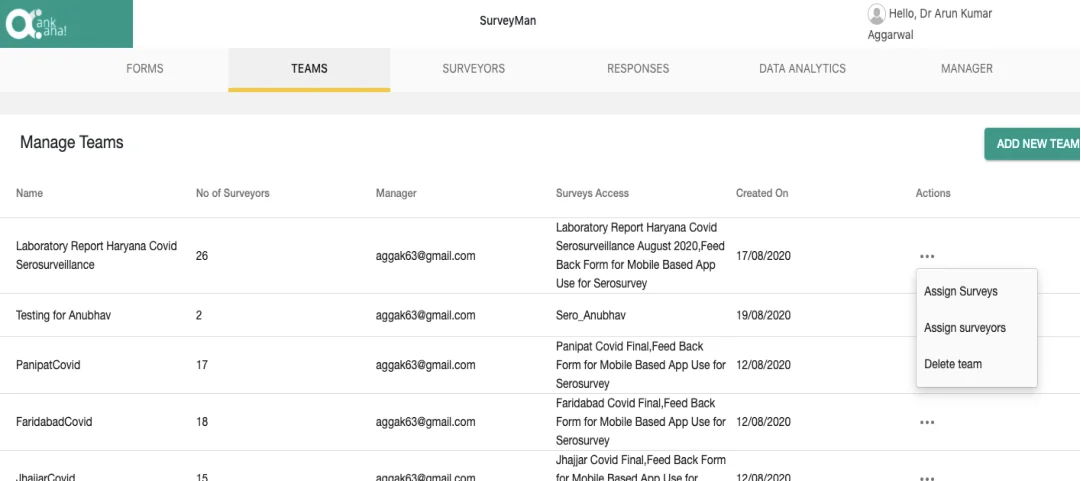
One can see the names of the teams, number of surveyors in each team, name of the manager for the team, and names of the survey forms available to each team. Once teams are formed, one can assign the surveys and surveyors to each team. New teams can also be added from here.
View and Download Responses
When survey data starts coming in, one can see the summary (number) of responses from the survey ‘Forms’ icon as described before. However, to look at the details, one can select the relevant survey form and see the details (Figure 4). In such large-scale surveys, this feature helps in real time monitoring. One can find out which surveyor is filling the forms. One can monitor the quality of the forms in terms of completeness. Since the contact number of the surveyor(s) is visible one can communicate with them, mentor the surveyor and take feedback regarding difficulties being faced by the surveyors. For this survey, we were thus able to mentor the surveyors in the entire state on a random basis.
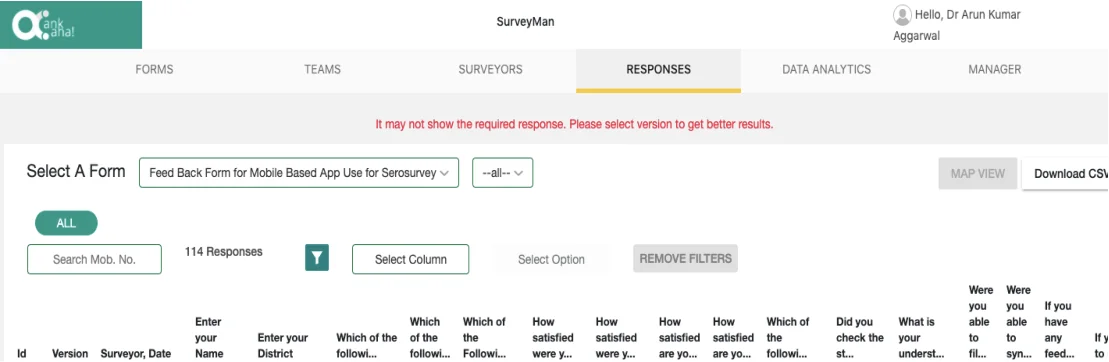
At the end of the survey, one can download the data file in comma separated value (csv) format for further analysis.
Data Analytics
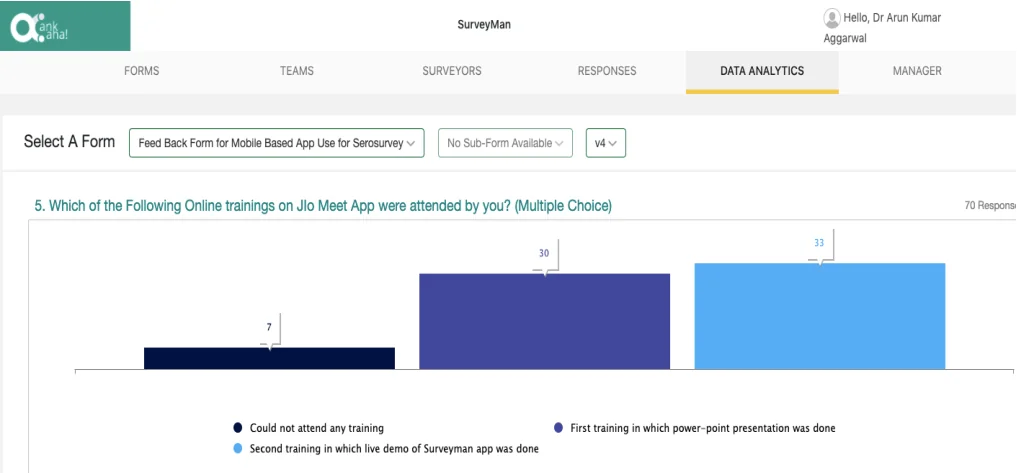
This function is similar to the one that many other apps offer, wherein some simple data analytics in terms of bar charts, pie charts are available. Summary of each variable can be viewed with fixed display of summary measure. (Figure 5)
Summary and Conclusions
Real-time data capture and monitoring was a huge success in a massive survey undertaken in entire state and completed within 3 days. The SurveyMan app has some features that are available with other apps also, such as real-time data collection, creation of form with various features including GPS (global positioning systems) based location [5,8], media [8] such as pictures, audio and video recordings. However, there are some novel features such as availability of in-built Google translator to create multilingual form, and a feature for creating teams and attaching the surveyors to the teams. Using the app, one can assign geographic boundaries to the surveyors within which they have to do the survey. The app is made in India, through Ank Aha Technologies - a social enterprise [9], the developers are not profit oriented, and provide local mentorship support at no-profit-no-loss basis. Capturing information on this app is also helpful in maintaining confidentiality. Data is not visible to anyone, but the surveyor and the principal investigator or manager. Except the surveyor, no one can alter the data. There is another novel feature in this app, though this was not used in the survey - the use of linked forms for longitudinal surveys. The app performed well for this survey.
Acknowledgements
We acknowledge the support of team of Ank Aha Technologies, led by Mr. Shantanu Aggarwal, who is a Harvard post-graduate and is leading the enterprise. We are grateful to the Haryana IDSP team led by Dr Usha Gupta, Director IDSP Haryana and her team namely Dr Krishan Kumar, Dr Dolly Gambhir, and all district nodal officers and surveyors of the level of medical officers, who participated in the trainings to use the app and who actually used the app.
Conflict of Interest
None. No funding was received from any source. The app and the technical support was made available as a gesture of social welfare, with the understanding that the actual cost of using the web server space will be borne by the users.
References
- Shaw WS, Main CJ, Findley PA, Collie A, Kristman VL, Gross DP. Opening the workplace after COVID-19: what lessons can be learned from return-to-work research?. J Occup Rehabil. 2020 Jun 19. 30, 299–302. https://doi.org/10.1007/s10926-020-09908-9
- Wahi MM, Parks DV, Skeate RC, Goldin SB. Reducing errors from the electronic transcription of data collected on paper forms: a research data case study. J Am Med Inform Assoc. 2008 May 1;15(3):386-9. https://doi.org/10.1197/jamia.M2381
- Paulsen A, Overgaard S, Lauritsen JM. Quality of data entry using single entry, double entry and automated forms processing–an example based on a study of patient-reported outcomes. PloS one. 2012 Apr 6;7(4):e35087. https://doi.org/10.1371/journal.pone.0035087
- UNICEF. UNICEF India Annual Report 2019- Key results for every child in India. UNICEF. 2020 May. Available from: https://www.unicef.org/india/reports/unicef-india-annual-report-2019. Last accessed 2020 Aug 30
- Nayak MS, Narayan KA. Strengths and weakness of online surveys. IOSR Journal of Humanities and Social Science. 2019;24(5):31-8. Available from: https://www.researchgate.net/profile/Mudavath_Nayak/publication/333207786_Strengths_and_Weakness_of_Online_Surveys/links/5ce241f8a6fdccc9ddbed1e8/Strengths-and-Weakness-of-Online-Surveys.pdf. Last accessed 2020 Aug 30
- AnkAha.com. SurveyMan: Robust data-collection and analysis, designed for all environments. Available from: https://surveyman.ankaha.com/survey-manager/home. Last accessed 2020 Aug 30
- HT Correspondent. Sero survey to determine virus exposure to begin next week in Haryana. Hindustan Times; Chandigarh. 2020 Aug 7. Available from: https://www.hindustantimes.com/chandigarh/sero-survey-to-determine-virus-exposure-to-begin-next-week-in-haryana/story-S7ugBO1Y5XOhREdJ1GodmO.html. Last accessed 2020 Aug 30
- Epicollect5 Data Collection User Guide. What is Epicollect5. Available from: https://docs.epicollect.net/. Last accessed 2020 Aug 30
- AnkAha.com. Our Mission. Available from: https://www.ankaha.com/about-us/. Last accessed 2020 Aug 30

Published
Article metrics
- Views
- 1,561
- Downloads
- 817
Based on this site's usage statistics.
Issue
Section
How to Cite
More in this topic: Health information & digital health
View Point · 2024
Digitalization of ASHA Work: Challenges and Way Forward